Debugging QEMU + OVMF with GDB
Introduction
Probably you know the signifince of debugging in any low-level programming projects. In the same way, we need to debug our UEFI Driver in some cases.
For me, debugging is essential — I can’t do my work properly without it. Even though I’m still new to UEFI development, I wanted to start debugging my own UEFI drivers as early as possible. Because many existing resources are outdated, I decided to share my debugging journey and update the information for 2025.
Using Macros for Debugging
In edk2 project, we can use DEBUG and ASSERT macros for debugging the uefi driver. To enable them, we need to configure our .dsc project.
DEBUG() Macro
In .dsc file, there are two PCDs:
- PcdDebugPropertyMask - Bit mask to determine which features are on/off
- PcdDebugPrintErrorLevel - Types of messages produced
In other word, if we can enable these macros we can modify these values.
Let’s modify our .dsc file. Open OvmfPkgX64.dsc and and search PcdDebugPrintErrorLevel:
# DEBUG_INIT      0x00000001  // Initialization
  # DEBUG_WARN      0x00000002  // Warnings
  # DEBUG_LOAD      0x00000004  // Load events
  # DEBUG_FS        0x00000008  // EFI File system
  # DEBUG_POOL      0x00000010  // Alloc & Free (pool)
  # DEBUG_PAGE      0x00000020  // Alloc & Free (page)
  # DEBUG_INFO      0x00000040  // Informational debug messages
  # DEBUG_DISPATCH  0x00000080  // PEI/DXE/SMM Dispatchers
  # DEBUG_VARIABLE  0x00000100  // Variable
  # DEBUG_BM        0x00000400  // Boot Manager
  # DEBUG_BLKIO     0x00001000  // BlkIo Driver
  # DEBUG_NET       0x00004000  // SNP Driver
  # DEBUG_UNDI      0x00010000  // UNDI Driver
  # DEBUG_LOADFILE  0x00020000  // LoadFile
  # DEBUG_EVENT     0x00080000  // Event messages
  # DEBUG_GCD       0x00100000  // Global Coherency Database changes
  # DEBUG_CACHE     0x00200000  // Memory range cachability changes
  # DEBUG_VERBOSE   0x00400000  // Detailed debug messages that may
  #                             // significantly impact boot performance
  # DEBUG_ERROR     0x80000000  // Error
  gEfiMdePkgTokenSpaceGuid.PcdDebugPrintErrorLevel|0x8000004F

!if $(SOURCE_DEBUG_ENABLE) == TRUE
  gEfiMdePkgTokenSpaceGuid.PcdDebugPropertyMask|0x17
!else
  gEfiMdePkgTokenSpaceGuid.PcdDebugPropertyMask|0x2F
!endif
In this configuration, two PCDs control the behavior of debugging features:
PcdDebugPrintErrorLevel
Defines which types of debug messages are enabled.
The value 0x8000004F enables:
-
DEBUG_ERROR – Error messages
-
DEBUG_INIT – Initialization messages
-
DEBUG_WARN – Warning messages
-
DEBUG_LOAD – Load events
-
DEBUG_INFO – Informational messages
This means the firmware will print these categories of debug logs during execution.
If SOURCE_DEBUG_ENABLE is true, then it sets bits as 0x2F, which means that enables additional debug features, including extended diagnostics and code tracking.
Since we’re working on OvmfPkgX64 the macros will be enabled. Let’s create a project:
#include <Uefi.h>
#include <Library/UefiApplicationEntryPoint.h>
#include <Library/UefiLib.h>
#include <Library/DebugLib.h>

EFI_STATUS EFIAPI UefiMain(EFI_HANDLE ImageHandle, EFI_SYSTEM_TABLE *SystemTable) {
  DEBUG((DEBUG_INFO, "Hello from DEBUG Macro!\n"));
  return EFI_SUCCESS;
}
and .inf file:
[Defines]
  INF_VERSION                    = 0x00010006
  BASE_NAME                      = HelloWorld
  MODULE_TYPE                    = UEFI_APPLICATION
  VERSION_STRING                 = 1.0
  ENTRY_POINT                    = UefiMain

[Sources]
  HelloWorld.c

[Packages]
  MdePkg/MdePkg.dec
  MdeModulePkg/MdeModulePkg.dec

[LibraryClasses]
  UefiApplicationEntryPoint
  UefiLib
  DebugLib
These macros are defined from DebugLib. Then invoke QEMU + OVMF with this code:
sudo qemu-system-x86_64 -s -pflash bios.bin -hda fat:rw:hda-contents -net none -debugcon file:debug.log -global isa-debugcon.iobase=0x402Start HelloWorld.efi and check the debug.log file:
cat debug.log

[...]

InstallProtocolInterface: 5B1B31A1-9562-11D2-8E3F-00A0C969723B 626B040
Loading driver at 0x00006202000 EntryPoint=0x00006202F8F HelloWorld.efi
InstallProtocolInterface: BC62157E-3E33-4FEC-9920-2D3B36D750DF 6270818
ProtectUefiImageCommon - 0x626B040
  - 0x0000000006202000 - 0x0000000000001BC0
InstallProtocolInterface: 752F3136-4E16-4FDC-A22A-E5F46812F4CA 7E7F168
Hello from DEBUG Macro!
FSOpen: Open '\' Success
We can see our message. Let’s use ASSERT Macro.
ASSERT() Macro
Also we have ASSERT() macro in EDK II and it is used to verify that certain conditions in the code are always true during development.
When the specified condition evaluates to FALSE, the macro prints a detailed error message showing the file name, line number, and failed expression, then halts execution by triggering a breakpoint or entering an infinite loop (usually through CpuDeadLoop()).
Let’s see an example. Change the project with this code:
EFI_STATUS EFIAPI UefiMain(EFI_HANDLE ImageHandle, EFI_SYSTEM_TABLE *SystemTable) {
  INTN Number = 10;
  ASSERT(Number != 0);
  DEBUG((DEBUG_INFO, "This line will be printed!\n"));
  return EFI_SUCCESS;
}
And run the project and check debug.log file:
[...]

Loading driver at 0x00006243000 EntryPoint=0x00006243F8F HelloWorld.efi
InstallProtocolInterface: BC62157E-3E33-4FEC-9920-2D3B36D750DF 626AE98
ProtectUefiImageCommon - 0x626A040
  - 0x0000000006243000 - 0x0000000000001BC0
InstallProtocolInterface: 752F3136-4E16-4FDC-A22A-E5F46812F4CA 7E7F168
This line will be printed!
Let’s think a sceneario that if the condition is not correct. Change the content of ASSERT Macro like this:
ASSERT(Number != 10);After the exection, the shell will be stuck and you will be see this output from debug.log:
[...]
ASSERT HelloWorld.c(8): Number != 10
This means that ASSERT macro has failed. You can use DEBUG and ASSERT macro for this sceneario.
Debugging UEFI Driver with GDB
Now we will see how can we debug our UEFI driver with GDB. Change the code of the project with this:
#include <Uefi.h>
#include <Library/UefiApplicationEntryPoint.h>
#include <Library/UefiLib.h>

EFI_STATUS EFIAPI UefiMain(EFI_HANDLEImageHandle, EFI_SYSTEM_TABLE  *SystemTable)
{
  Print(L"Hello UEFI World!\n");
  return EFI_SUCCESS;
}
Compile them and move these files to hda-contents:
- HelloWorld.efi
- HelloWorld.debug
Then invoke QEMU + OVMF with this command:
qemu-system-x86_x64 -s -pflash bios.bin -hda fat:rw:hda-contents -net none -debugcon file:debug.log -global isa-debugcon.iobase=0x402 Run the HelloWorld.efi and open the second terminal. Then check the content of debug.log:
InstallProtocolInterface: 5B1B31A1-9562-11D2-8E3F-00A0C969723B 626B040
Loading driver at 0x00006201000 EntryPoint=0x00006202314 HelloWorld.efi
InstallProtocolInterface: BC62157E-3E33-4FEC-9920-2D3B36D750DF 6270818
Note the address of loaded driver (in my case it is 0x00006201000).
Invoke GDB with –tui parameter in another terminal and load the .efi file from hda-contents:
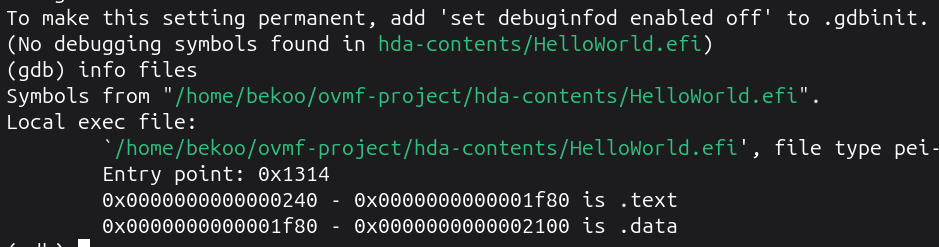
Now we need to calculate .text and .data section for the debug file. Here’re the formulas:
.text = LoadedAddress + TextAddress
.data = LoadedAddress + TextAddress + DataAddress
With the values from the gdb’s output we will perform the calculation:
.text = 0x00006201000 + 0x0000000240 = 0x6201240
.data = 0x00006201000 + 0x0000000240 + 0x0000001f80 = 0x62031c0
Perform this calculation with your loaded driver address. You can use an online hex calculator.
Replace the results to the .debug life:
(gdb) add-symbol-file hda-contents/HelloWorld.debug 0x6201240 -s .data 0x62031c0
add symbol table from file "hda-contents/HelloWorld.debug" at
	.text_addr = 0x6201240
	.data_addr = 0x62031c0
(y or n) y
Reading symbols from hda-contents/HelloWorld.debug...
You should see this output from tui screen:
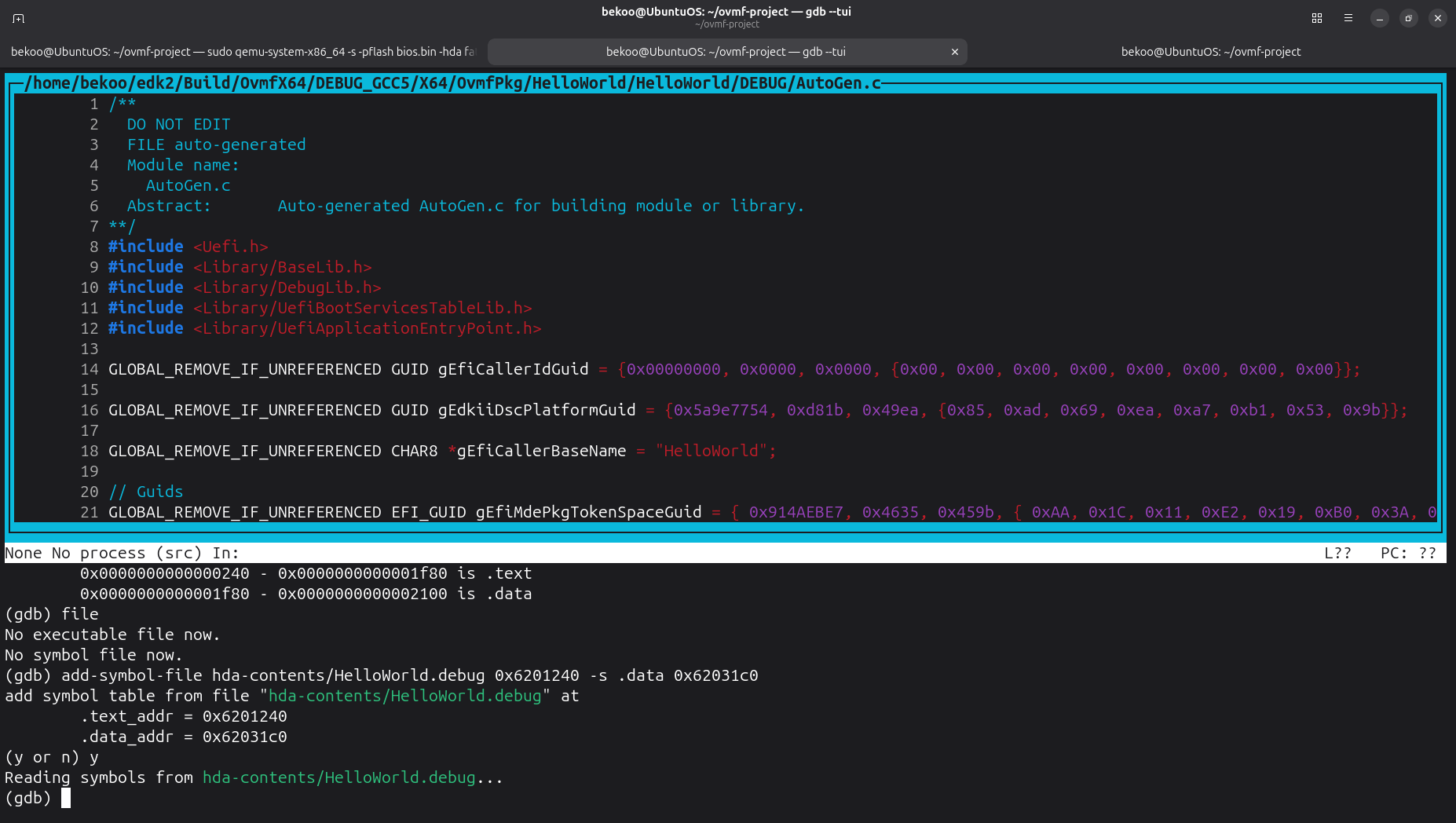
Now we can debug our UEFI driver.
Set a bp to UefiMain and continue with QEMU:
(gdb) break UefiMain
Breakpoint 1 at 0x6202467: file /home/bekoo/edk2/OvmfPkg/HelloWorld/HelloWorld.c, line 7.

(gdb) target remote localhost:1234
Remote debugging using localhost:1234
warning: No executable has been specified and target does not support
determining executable automatically.  Try using the "file" command.
0x0000000006ce6de1 in ?? ()

(gdb) c
Continuing.
Run HelloWorld.efi again and check the GDB:
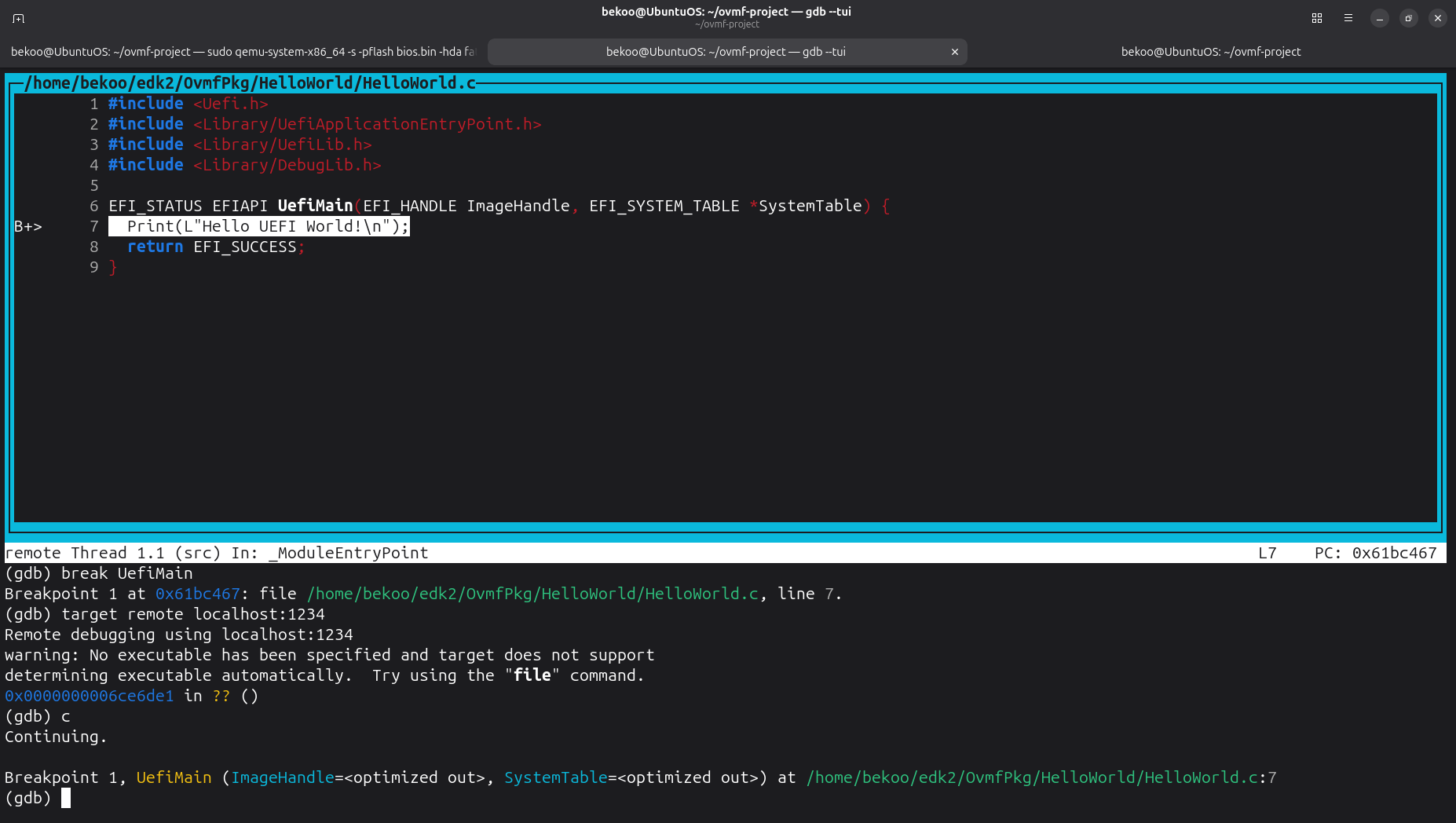
That’s all!
Possible An Issue
When i tried these steps for another projects, i usually saw an issue; Although the calculation is correct, it didn’t calculate correctly .text and .data sections:
If you have this problem, probably it will not find your UefiMain symbol:

For the solution, set a bp to the EntryAddress of UEFI Driver. You can get the address of EntryPoint from debug.log:
Loading driver at 0x00006201000 EntryPoint=0x00006202314 HelloWorld.efiThen delete the bp of EntryPoint address and connect the QEMU:
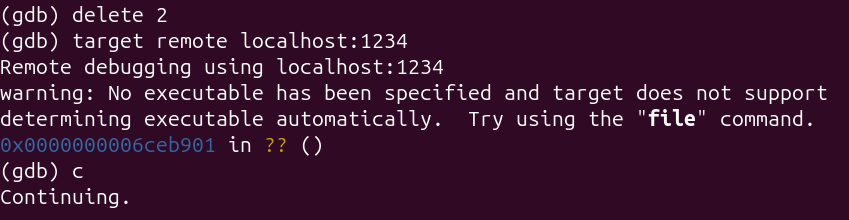
And run the .efi file again and check the GDB:

You can fix this issue with this way.
Simple Scenerio for Debugging
As a simple scenerio, we will debug our UEFI driver:
#include <Uefi.h>
#include <Library/UefiApplicationEntryPoint.h>
#include <Library/UefiLib.h>
#include <Library/DebugLib.h>

EFI_STATUS EFIAPI UefiMain(EFI_HANDLE ImageHandle, EFI_SYSTEM_TABLE *SystemTable) {
    DEBUG((DEBUG_INFO, "Hello!\n"));
    return EFI_SUCCESS;
}
Follow the steps above and then set bp to UefiMain:
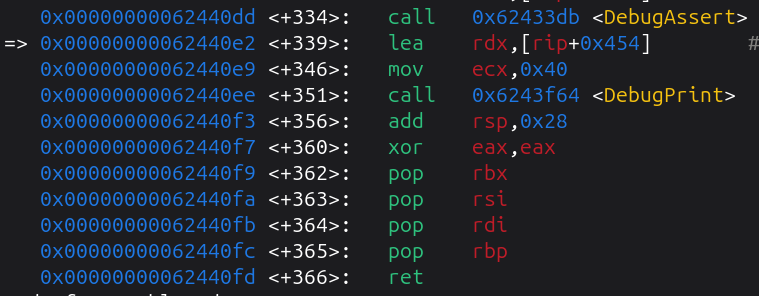
Now we are in UefiMain. We will examine DebugPrint :>
Firstly we can see that our parameters are prepared and DebugPrint is called. This is simply track. Set a bp and check the registers:
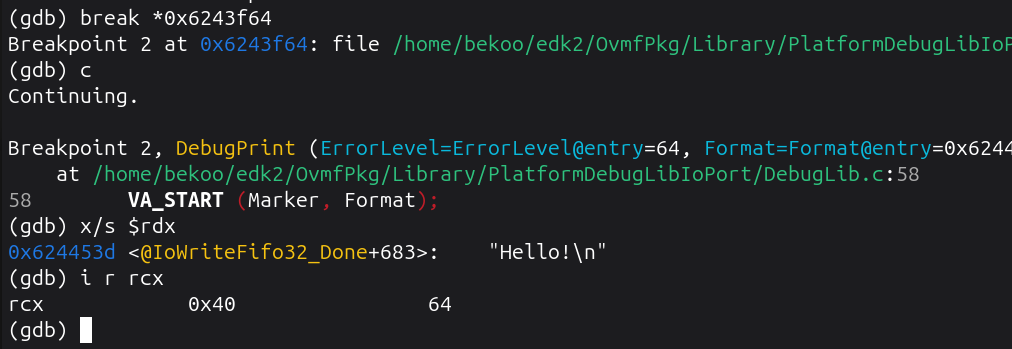
In this case, 0x40 is DEBUG_INFO. Let’s see DebugPrint:
Dump of assembler code for function DebugPrint:
=> 0x0000000006243f64 <+0>:	push   rbp
   0x0000000006243f65 <+1>:	mov    rbp,rsp
   0x0000000006243f68 <+4>:	push   rdi
   0x0000000006243f69 <+5>:	mov    rdi,rcx
   0x0000000006243f6c <+8>:	push   rsi
   0x0000000006243f6d <+9>:	mov    rsi,rdx
   0x0000000006243f70 <+12>:	lea    rdx,[rbp+0x20]
   0x0000000006243f74 <+16>:	sub    rsp,0x10
   0x0000000006243f78 <+20>:	mov    QWORD PTR [rbp-0x18],rdx
   0x0000000006243f7c <+24>:	mov    QWORD PTR [rbp+0x20],r8
   0x0000000006243f80 <+28>:	mov    QWORD PTR [rbp+0x28],r9
   0x0000000006243f84 <+32>:	call   0x6243eef <DebugPrintMarker>
   0x0000000006243f89 <+37>:	pop    rdx
   0x0000000006243f8a <+38>:	pop    rcx
   0x0000000006243f8b <+39>:	pop    rsi
   0x0000000006243f8c <+40>:	pop    rdi
   0x0000000006243f8d <+41>:	pop    rbp
   0x0000000006243f8e <+42>:	ret
The message is passed to rsi, while the 0x40 value is passed to rdi. Then it calls DebugPrintMarker:
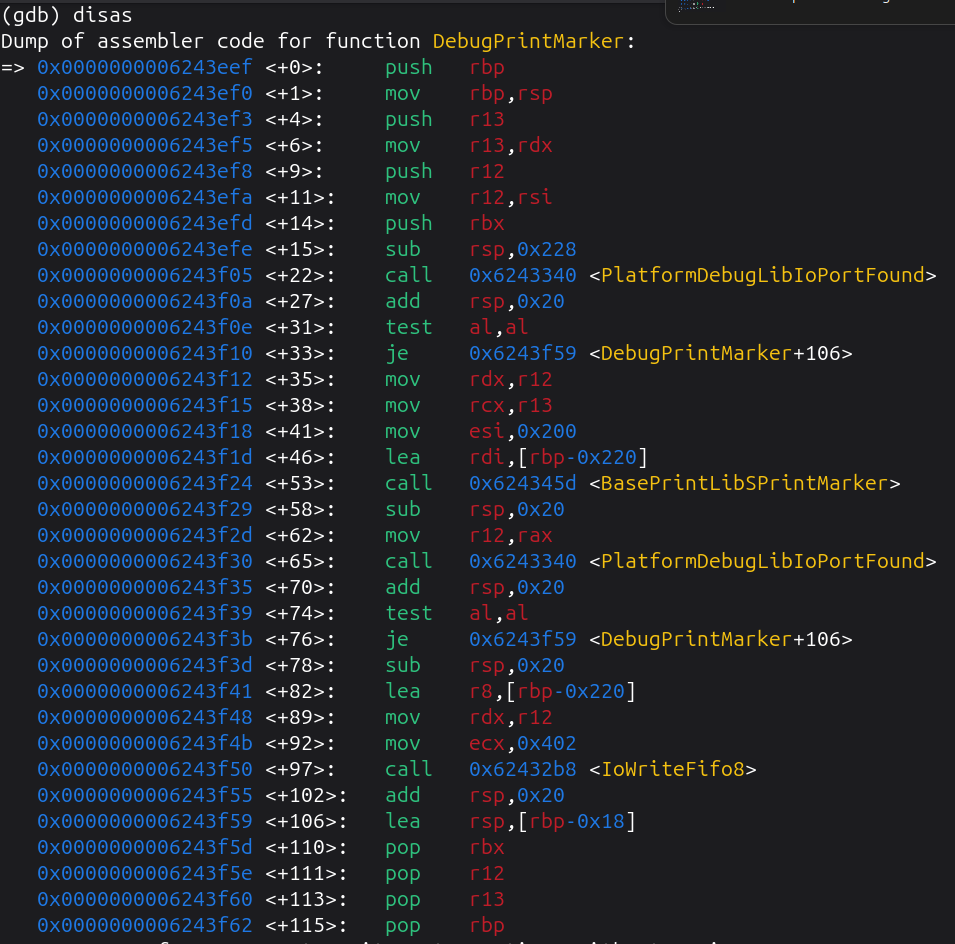
Here, our message is printed via IoWriteFile. This function gets three parameters:
VOID
EFIAPI
IoWriteFifo8 (
  IN      UINTN  Port,
  IN      UINTN  Count,
  IN      VOID   *Buffer
  )
{
  if (IsTdxGuest ()) {
    TdIoWriteFifo8 (Port, Count, Buffer);
  } else {
    SevIoWriteFifo8 (Port, Count, Buffer);
  }
}
Let’s see our parameters:
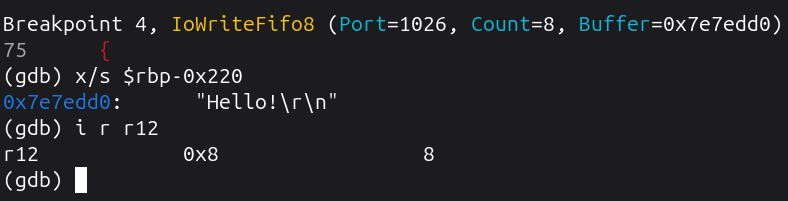
Also notice that the 0x402 value is passed to the Port parameter as hardocoded value. This is our iobase value provided to QEMU.
Conclusion
In this documentation, we learned how to debug a UEFI driver using different methods and tools. First, we explored how to enable and use the DEBUG() and ASSERT() macros in the EDK II environment. Then we saw how to using GDB for debugging.
Overall, this documentation showed the complete process of setting up and performing UEFI driver debugging — from using macros for quick checks to using GDB for deep analysis.
I hope this documentation helps you understand and apply effective debugging techniques in your own UEFI development projects :>